

Does your optical store REALLY require barcodes? 🤷
For many optical stores, a well-organised, searchable inventory system can make everyday product lookup faster and simpler, without making every frame dependent on a physical barcode.

Barcodes have become almost inseparable from modern retail. Spectacle frames and sunglasses are selected visually. Customers discuss brands, colours, shapes and styles. Staff usually remember products by their brand, model, size, colour or supplier, not by the number printed on a barcode tag.
This raises an important question: does every optical store really need to generate, print and scan barcodes? Not always.
For many optical stores, a well-organised, searchable inventory system can make everyday product lookup faster and simpler, without making every frame dependent on a physical barcode.
What are barcodes used for in an optical store?
In an optical store, barcodes may be used to:
- Receive frames, sunglasses and accessories into inventory
- Find a product at the billing counter
- Record a sale and reduce the available quantity
- Perform physical stock counts
- Transfer products between branches
- Track frames through ordering and dispensing workflows
- Distinguish between variations such as colour and size
The barcode itself does not necessarily contain the complete product description, price or stock quantity. It usually provides an identifier that connects the physical frame to information stored in the inventory database.
How are barcodes currently generated and used?
A conventional optical barcode workflow usually begins in one of two ways.
Some frames arrive with a UPC or manufacturer-assigned product code. The optical store can enter or import that code into its inventory software. If a usable code is unavailable, the store may create an internal SKU and generate its own barcode.
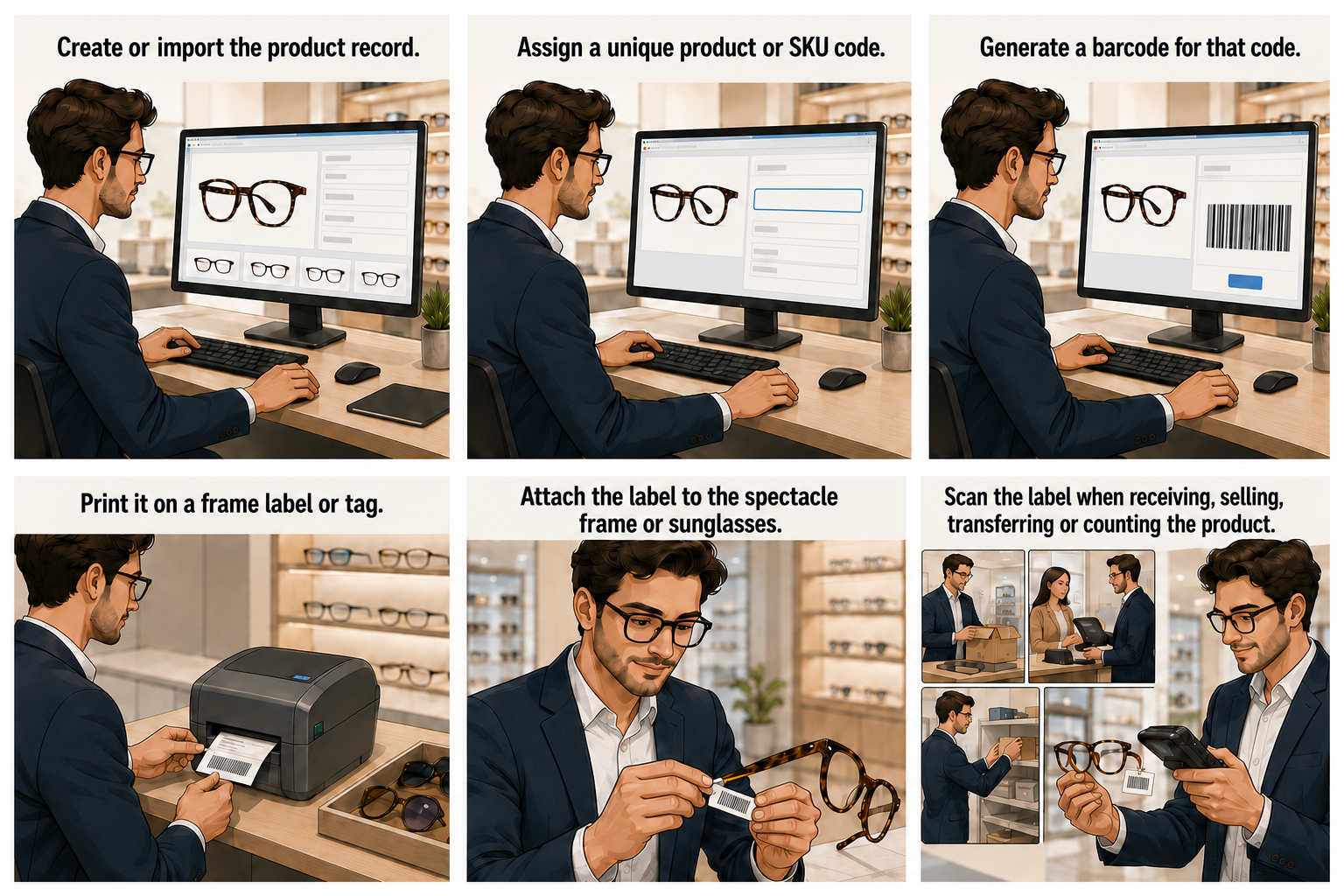
The usual process then looks like this:
- Create or import the product record.
- Assign a unique product or SKU code.
- Generate a barcode for that code.
- Print it on a frame label or tag.
- Attach the label to the spectacle frame or sunglasses.
- Scan the label when receiving, selling, transferring or counting the product.
Scanning may take only a second, but building and maintaining this workflow requires additional effort. Traditional optical barcode systems may require a compatible barcode reader, a barcode label printer, label rolls, ribbons, printer drivers and correctly configured software. Staff may also need to learn how to operate and troubleshoot this equipment.
The hidden cost of attaching a barcode to every frame
A barcode system requries a physical barcode tag for every product.
Labels must be generated, printed, separated and attached to frames. New stock must be tagged before it reaches the display. Missing, damaged or faded labels must be replaced. Printers need paper or labels, and ribbons eventually run out.
Barcode tags can also create practical problems on the shop floor. They may become detached while customers try on frames, interfere with the way products are displayed or leave residue behind when removed.
Another limitation is that the barcode must be physically available and readable. If a tag is missing, folded or damaged, the scan-first workflow is interrupted. If a customer asks whether the same frame is available in another colour or size, scanning the frame in their hand retrieves only that exact product. Staff may still need to search the inventory to compare other available options.
What if your team could simply search?
Instead of making the barcode the primary way to find a product, ASIRA Inventory allows staff to search the digital inventory directly. A team member can enter what they know, review the matching products and open the relevant record.
The inventory interface displays useful information including the product, brand, model and supplier. Staff can also filter products by stock level, making it easier to identify items with no stock, low stock or normal stock.
This enables your team to immediately answer questions quickly:
- Is this product in stock?
- What other options are available?
- Is this product model available and in-stock?
- Which frames came from this supplier?
There is no need to find a tag, position it under a reader or return to a dedicated scanning terminal just to retrieve product information.
ASIRA Inventory still supports barcodes where they are genuinely useful, and can generate Code 128 barcodes or QR codes for individual SKUs, regenerate codes when necessary and prepare printable barcode sheets in A4 or Letter format. However, barcodes can remain an optional operational tool instead of becoming a requirement for every everyday inventory task.
Why is a search-based inventory system better?
It matches how optical teams think
People naturally remember a brand, model, colour, style or supplier. Search works with this familiar information instead of requiring staff to find and scan an arbitrary number.
It reduces hardware dependence
A search-first workflow does not require a dedicated barcode reader or barcode label printer for routine product lookup. This reduces equipment costs, configuration work and dependence on consumables.
It eliminates repetitive tagging
Products can be added to the inventory catalogue without making the workflow dependent on printing and attaching a physical barcode to every frame.
It works even when a tag is missing
A searchable product record remains accessible when a barcode label is lost, damaged or difficult to read.
It makes comparison easier
A barcode generally identifies one exact item. Search helps staff review related products, variants, suppliers and stock levels together. This is particularly useful when helping a customer compare frames.
It creates a better sales experience
Staff can remain focused on the customer instead of turning a frame around to find its tag or walking away to locate a scanner. Faster access to product information can make the interaction feel more confident and organised.
So should optical stores stop using barcodes completely?
Not necessarily.
Barcodes are still valuable for high-volume checkout, large stock receipts, repetitive physical inventory counts, warehouse operations and multi-location transfers. A large optical chain processing thousands of products may benefit significantly from scanning.
Search first. Scan when it adds value.
A barcode system can accelerate repetitive retail processes, but it also introduces hardware, consumables, physical labels and ongoing maintenance.
ASIRA Inventory keeps the digital product record at the centre of inventory management. Your team can search for products, review relevant details and check stock without needing to scan a tag attached to a spectacle frame or pair of sunglasses.
Use barcodes where scanning delivers a clear operational advantage. Use search where the work should be simpler. Because the best optical inventory management system is not the one with the most equipment. It is the one your team can use quickly, accurately and consistently every day.
ASIRA is a cloud-based EMR and practice management software built by eye care professionals for eye care professionals. We have helped hundreds of practices change the way they work. To find out more, visit www.asira.health and sign up for a FREE TRIAL!


Comments ()