

Digital Eye Strain in the Hybrid Work Era: Current Best Practices for Diagnosis and Management
While this work flexibility brings numerous benefits, it has also contributed to a rise in digital eye strain (DES), also referred to as computer vision syndrome (CVS).

Introduction
The shift to hybrid and remote work has transformed how people engage with digital devices. Many professionals now spend upwards of six to ten hours per day in front of computers, tablets, or smartphones. While this work flexibility brings numerous benefits, it has also contributed to a rise in digital eye strain (DES), also referred to as computer vision syndrome (CVS).
DES encompasses a broad spectrum of ocular, visual, and musculoskeletal symptoms resulting from prolonged digital device use. These symptoms can range from mild discomfort to significant impairment of visual performance and productivity. As screen time becomes an integral part of professional and personal life, understanding the causes, risk factors, and evidence-based management strategies for DES is critical for both clinicians and patients.
Epidemiology of Digital Eye Strain
The prevalence of DES is striking. Studies suggest that 50–90% of computer users report one or more symptoms associated with prolonged screen use (Sheppard & Wolffsohn, 2018). During the COVID-19 pandemic, the increase in remote work further amplified screen exposure, leading to higher rates of DES among employees. Al Ashkar et al. (2024) reported that prolonged home-based computer use significantly correlated with increased ocular discomfort, headaches, and visual fatigue.
DES is not limited to adults; students, especially those engaged in online learning, are also affected. Wang et al. (2023) found a high prevalence of DES in both undergraduate and medical students during periods of extended virtual learning.
Pathophysiology of Digital Eye Strain
DES is multifactorial, resulting from visual, ocular surface, and musculoskeletal factors:
- Visual Factors: Prolonged near work can lead to accommodative fatigue and convergence strain. Extended focus on digital screens requires constant adjustment of the ciliary and extraocular muscles, which can lead to eye fatigue, blurred vision, and headaches.
- Ocular Surface Issues: Reduced blinking during screen use decreases tear film stability, leading to dry eye symptoms, irritation, and burning sensations (Portello et al., 2012).
- Musculoskeletal Factors: Poor ergonomics, such as improper chair height, monitor positioning, or keyboard placement, can contribute to neck, shoulder, and back discomfort, which often co-occurs with ocular symptoms.
Understanding these mechanisms helps clinicians develop effective, multifaceted management plans.
Clinical Presentation
DES manifests through a combination of ocular and systemic symptoms:
- Eye fatigue or heaviness
- Blurred or fluctuating vision
- Headaches, often tension-type
- Dry, irritated, or burning eyes
- Neck, shoulder, or back pain
Symptoms are often worse toward the end of the workday or after prolonged uninterrupted digital device use. Patients may not recognize these symptoms as being related to screen use, highlighting the importance of thorough history-taking and patient education.
Risk Factors
Several factors increase the likelihood of DES:
- Extended screen time without breaks
- Poor lighting or glare on screens
- Improper screen distance or monitor height
- Uncorrected refractive errors, including presbyopia
- Existing dry eye disease or ocular surface abnormalities
- High visual demand tasks, such as coding, data entry, or online learning
Understanding patient-specific risk factors allows for tailored intervention strategies.
Diagnostic Strategies
Effective diagnosis of DES involves both subjective assessment and objective testing:
- Patient History: A detailed inquiry about screen duration, types of devices used, work environment, and onset of symptoms.
- Symptom Questionnaires: Validated tools such as the Computer Vision Syndrome Questionnaire (CVS-Q) allow clinicians to quantify the severity of symptoms.
- Comprehensive Eye Examination: Includes visual acuity testing, refractive assessment, binocular vision evaluation, and ocular surface examination to identify underlying conditions that may exacerbate symptoms.
- Observation of Blink Patterns and Ergonomics: Clinicians should assess blink rate, screen position, and posture to identify modifiable environmental contributors.
Pucker (2024) emphasizes a comprehensive evaluation to distinguish DES from other ocular disorders such as uncorrected refractive errors, ocular surface disease, or accommodative insufficiency.
Management Strategies
Management of DES is multifaceted, targeting visual, ocular surface, and ergonomic factors:
1. Ergonomic Adjustments
- Maintain a screen distance of 20–28 inches from the eyes.
- Position the top of the monitor at or slightly below eye level.
- Ensure adequate ambient lighting to reduce glare and reflections.
- Consider anti-glare filters or monitor coatings for high-glare environments.
2. Visual Hygiene Techniques
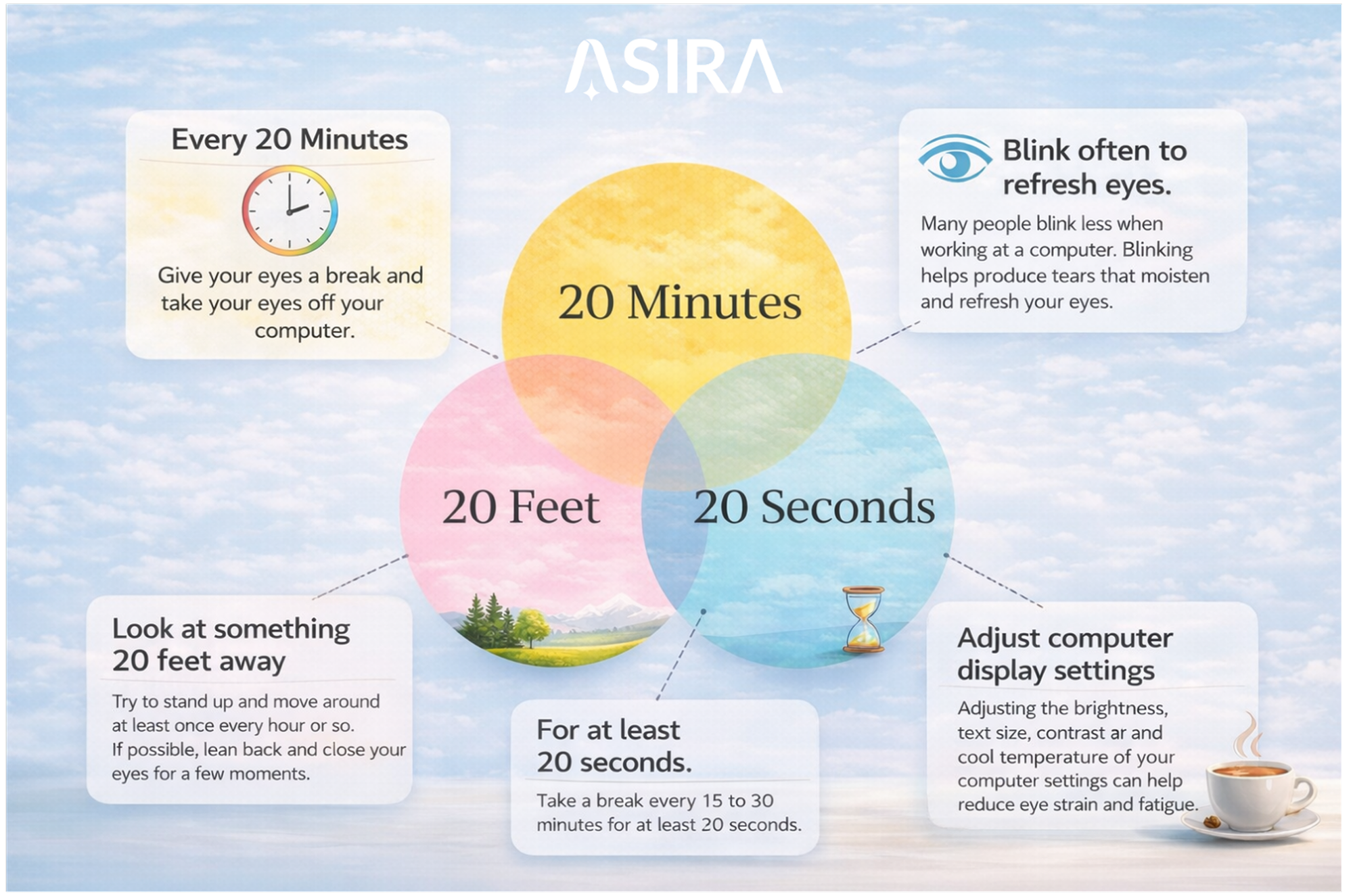
- 20-20-20 Rule: Every 20 minutes, look at an object 20 feet away for 20 seconds to relax accommodative muscles.
- Encourage conscious blinking to maintain tear film integrity.
3. Ocular Surface Management
- Use preservative-free artificial tears to alleviate dryness.
- Consider environmental modifications such as humidifiers in dry office settings.
- Address underlying ocular surface disease where present.
4. Corrective Lenses
- Lenses designed for computer use with anti-reflective coatings reduce glare and visual strain.
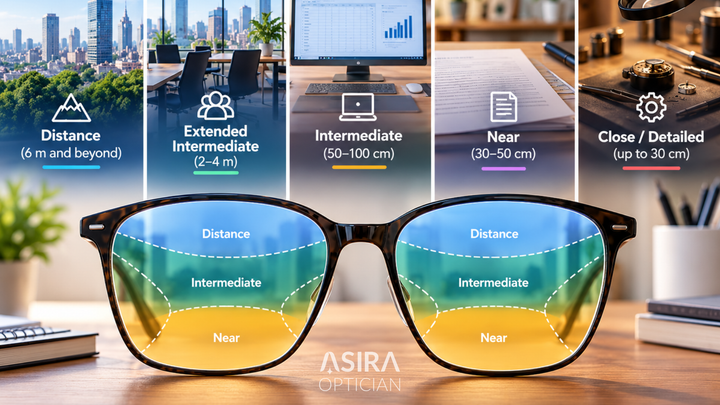
- Presbyopic patients may benefit from occupational multifocal or computer-specific lenses.
5. Behavioral Modifications
- Encourage regular breaks and physical activity.
- Educate patients on proper posture and optimal workstation ergonomics.
- Reduce continuous screen exposure when possible.
Evidence-Based Interventions
Peer-reviewed studies support these interventions:
- Blink Exercises: Conscious blinking exercises significantly improved ocular surface symptoms in a randomized trial (Rosenfield, 2016).
- Blue Light Filters: Some studies suggest that blue light-blocking lenses can reduce subjective eye strain, though evidence remains mixed (Stringham et al., 2017).
- Ergonomic Training: Programs emphasizing proper workstation setup and posture have shown reductions in both musculoskeletal and ocular discomfort (Anshel, 2010).
- Environmental Modifications: Adjusting lighting and reducing glare have consistently been shown to alleviate DES symptoms.
Patient Education
Patient education is essential for effective DES management:
- Explain the causes and contributing factors of DES.
- Demonstrate ergonomic setup and proper screen habits.
- Reinforce the importance of regular breaks, blinking exercises, and ocular lubrication.
- Provide written or digital educational resources for home and workplace reference.
Patient engagement and education have been shown to improve adherence to DES management strategies and reduce symptom severity (Mylona, 2023).
Special Considerations
- Children and Adolescents: Online learning has significantly increased DES in younger populations. Clinicians should monitor screen time and implement protective strategies early.
- Contact Lens Wearers: DES symptoms can be exacerbated by contact lens dryness. Recommend rewetting drops and periodic lens breaks.
- High-Risk Occupations: Professions requiring prolonged computer use or precision visual tasks are at higher risk; tailored interventions should be prioritized.
Conclusion
Digital eye strain is a growing concern in the era of hybrid work and pervasive digital device use. Its multifactorial nature, encompassing visual, ocular surface, and musculoskeletal components, requires a comprehensive, evidence-based approach.
Effective management involves ergonomic adjustments, visual hygiene practices, ocular surface care, corrective lenses, and patient education. Peer-reviewed literature supports these strategies as effective in reducing symptom burden and improving visual comfort.
By adopting a proactive, patient-centered approach, clinicians can help mitigate the impact of DES, improving both visual function and quality of life for affected individuals. Continued research into ergonomic interventions, digital screen design, and ocular physiology will further enhance the prevention and management of this increasingly prevalent condition.
References
- Al Ashkar, I. F., et al. (2024). Prevalence of Computer Vision Syndrome Among Remote Workers During the COVID-19 Pandemic.
- Sheppard, A. L., & Wolffsohn, J. S. (2018). Digital eye strain: prevalence, measurement and amelioration. BMJ Open Ophthalmology, 3(1)
- Rosenfield, M. (2016). Computer vision syndrome: a review of ocular causes and potential treatments. Ophthalmic & Physiological Optics, 36(5), 586–598.
- Stringham, J. M., Stringham, N. T., O’Brien, K. J. (2017). Blue light filtering spectacle lenses: optical and clinical effects. Optometry and Vision Science, 94(1), 50–59.


Comments ()